
Embroidery file repair
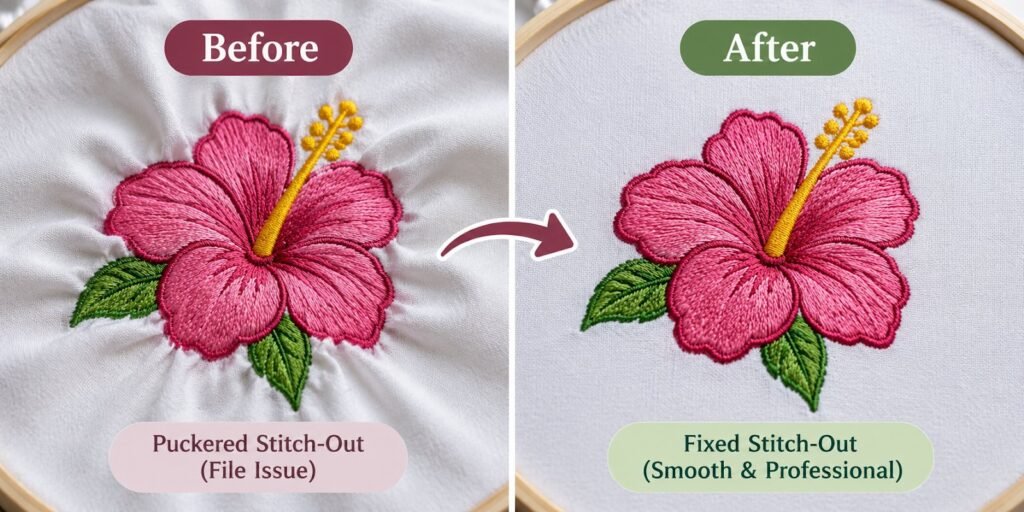
If a stitch file puckers, gaps, breaks thread, or turns small text into a blob, the problem is usually in the digitizing, not your machine. We repair and edit embroidery files — fixing density, underlay, pull compensation, pathing and trims — or rebuild them properly when they are beyond saving.
Embroidery file repair fixes stitch files that sew badly: thread breaks, puckering, gaps, misalignment and heavy, bulletproof fills. We edit existing embroidery files or redigitize them when editing will not fix the problem.
| Price | Quoted per file — send the file and a photo of the sew-out |
| What you get | A corrected stitch file plus a stitch-out preview |
| File formats | DST, PES, EXP, JEF, VP3, EMB and more |
| Proof | You see the corrected preview before the final file |
| Delivery | By email — nothing to ship |
Common problems we fix
| Problem | Usual cause | Fix |
|---|---|---|
| Puckering and fabric pulling | Too much density or weak underlay | Lower density, add the right underlay |
| Gaps between colours and outlines | No pull compensation | Add compensation and overlaps |
| Thread and needle breaks | Stitches stacked too densely | Reduce stacking, remove hidden layers |
| Unreadable small text | Text too small or wrong stitch type | Resize or re-letter |
| Too many trims and jumps | Poor pathing | Re-order the sequence |
| Bulletproof, stiff embroidery | Density too high for the fabric | Rebalance for the garment |
| Design shifting on caps | Flat file sewn on a cap | Re-sequence centre-out — see cap digitizing |
Resizing a stitch file
A machine file can usually be resized by around 10 to 20 percent before density goes wrong. Beyond that, we rebuild the stitches at the new size so the fill and satin columns are right for it, rather than stretching the old ones.
What to send us
- The stitch file — and the working file if you have it
- A photo of the sew-out showing the problem
- The garment or fabric it is going on
- Your machine and needle/thread setup if it is unusual
Repair or redigitize?
Some files only need small edits. Others are auto-digitized or badly built and cost more to fix than to digitize again. We tell you which, honestly, before you pay. See embroidery digitizing.
Embroidery file editing and stitch editing
Embroidery file editing covers changes such as removing a colour, replacing text, changing a colour order or moving an element. Embroidery stitch editing goes deeper, adjusting stitch direction, underlay, pull compensation and push compensation so the design sews flat and true to shape. Both start with checking the file on a stitch simulator before anything is changed.
Embroidery digitizing correction
When a design was auto-digitized or scaled too far, editing alone is rarely enough. Embroidery digitizing correction rebuilds problem areas with proper pathing and density. Embroidery design cleanup removes tiny stitches, excess jumps and trims, which cuts sewing time and thread breaks.
- Stitch density optimization for lighter, softer embroidery
- Stitch count optimization to shorten sewing time
- Embroidery pathing fixes to reduce jumps and trims
- Embroidery design editing for new sizes or fabrics
Embroidery file conversion
Embroidery file conversion between DST, PES, JEF, EXP, VP3 and other formats is often where problems start, because some formats drop colour information or trims. We convert files carefully and check the result before sending, and we can rebuild a design when a conversion has lost detail.
Common questions
Can you fix a file from another digitizer?
Yes, in any common format. Working files make edits easier, but they are not required.
Can you change the colours or text?
Yes. We can change thread colours, edit lettering, remove elements or add a name.
Can you reduce the stitch count?
Yes. We optimise stitch count to cut sewing time, which matters on bulk orders.
Can you fix a file if I only have the DST?
Yes. DST holds stitch data only, so we work at the stitch level or redigitize from the stitch-out if needed.
Why does my design pucker?
Usually too much density, missing underlay or the wrong backing. We check the file and tell you which it is.
Get a free quote
Send us your artwork or existing file, the finished size, what it will be sewn on and your machine format. Choose “Embroidery digitizing” as the product and we will come back with a price. If you cannot attach artwork here, email it to hello@sewwhatembroiderydesigns.com.