
Embroidery file formats
Embroidery machines each read their own file format. A PES file runs on a Brother, a JEF on a Janome, a DST on almost any commercial machine. Here is which format your machine needs, what each one keeps, and why converting between them is not always as simple as renaming the file.
Formats by machine brand
Embroidery file formats tell your machine where to sew each stitch. This guide explains which format each machine brand uses — DST, PES, JEF, EXP, VP3, HUS and more — and which embroidery file format you should order.
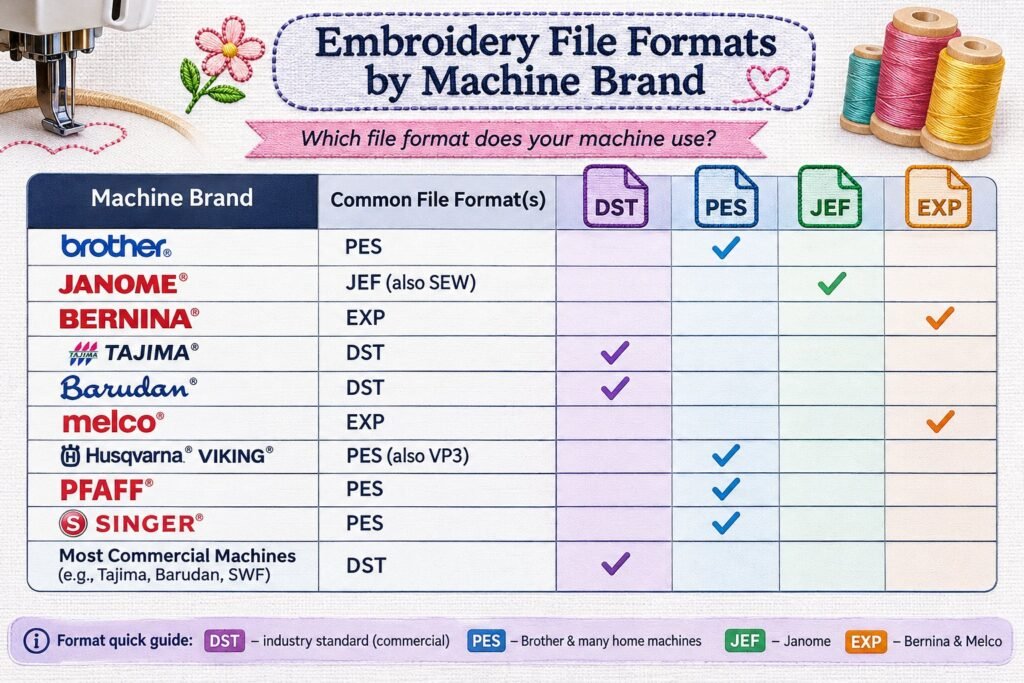
| Format | Machines | Notes |
|---|---|---|
| DST | Tajima and most commercial multi-needle machines (Barudan, Ricoma, SWF, Happy and others) | The industry standard. Stores stitches and colour changes but not thread colours |
| PES | Brother and Baby Lock | Stores thread colours; the most common home format |
| JEF | Janome | Janome home machines; older Janome models use SEW |
| EXP | Melco and Bernina | Stitch data, often with a separate colour file |
| VP3 | Husqvarna Viking and Pfaff | Stores colours and design information |
| HUS and VIP | Older Husqvarna Viking and Pfaff | Legacy home formats |
| XXX | Singer | Singer home machines |
| DSB | Barudan | Barudan-specific stitch format |
| TAP | Happy | Happy Japan machines |
| EMB | Wilcom EmbroideryStudio | A working file, not a machine file — it keeps the editable objects |
Machine files vs working files
Formats like DST and PES are machine files: they hold the final list of stitches, like a printout. A working file — Wilcom EMB, Hatch EMB and similar — holds the objects the digitizer built, such as a satin column or a fill area, with its density, underlay and pull compensation. That is why a working file can be resized and edited properly, while a machine file can only be nudged a little.
Why conversion is not always clean
- Converting a DST into a PES keeps the stitches but not the thread colours, because DST never stored them
- Resizing a machine file by more than about 10 to 20 percent changes stitch density, so the design either gaps or gets bulletproof-stiff
- Auto-converting between formats with free software can drop trims and jumps
- The safe route is to output each format from the original working file
Which format should I order?
Tell us your machine brand and model and we send the right format. For commercial machines we usually supply DST plus your brand’s native format. If you have several machines, we can supply every format you need from one digitized design.
DST, PES, JEF and EXP embroidery files
DST embroidery files are the industry standard for commercial multi-needle machines from Tajima, Barudan, Ricoma, SWF and Melco. PES embroidery files are for Brother and Baby Lock home machines. JEF embroidery files are for Janome and Elna. EXP embroidery files are used by Bernina and Melco. Most machines read more than one format, so check your manual or the machine’s screen for the list it accepts.
VP3, HUS, XXX, SEW and other formats
- VP3 and HUS embroidery files: Husqvarna Viking and Pfaff
- XXX embroidery files: Singer and some Compucon machines
- SEW embroidery files: older Janome machines
- VIP embroidery files: older Husqvarna Viking and Pfaff
- DSB and TAP embroidery files: Barudan and Happy
- EMB embroidery files: Wilcom’s working file, not a machine file
If you’re not sure, send us your machine’s make and model and we will supply the right format.
Embroidery machine file formats vs working files
Machine files hold stitches. Working files, such as Wilcom EMB, also hold the objects, so a design can be resized and edited cleanly. When you order embroidery digitizing, ask for both: a machine file to sew today, and a working file in case you need changes later. Hatch embroidery digitizing files can be supplied the same way.
Common questions
Can you convert my file to another format?
Yes. If the file sews well we convert it; if it needs fixing first, see embroidery file repair.
Can I open a DST on my Brother?
Many Brother machines read DST, but thread colours will not show. A PES is better.
Do you supply the working file?
Ask when you order. We can include the working file on request.
Can I convert a PES file to DST myself?
Yes, with most embroidery software, but check the result. Colour stops and trims can be lost in conversion.
Which format do commercial machines use?
DST is the most widely accepted format on commercial machines.
Get a free quote
Send us your artwork or existing file, the finished size, what it will be sewn on and your machine format. Choose “Embroidery digitizing” as the product and we will come back with a price. If you cannot attach artwork here, email it to hello@sewwhatembroiderydesigns.com.