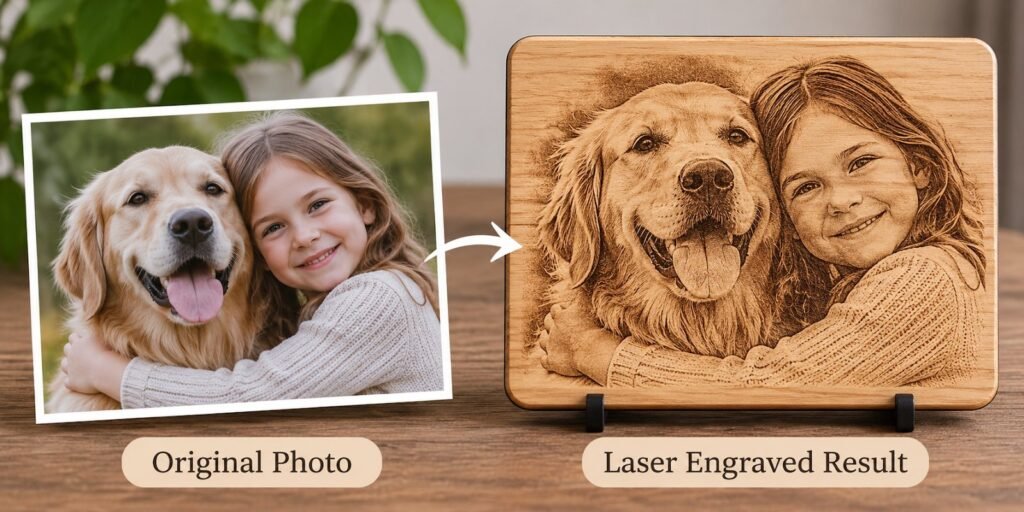
Photo and logo to engraving file
Send us a photo, portrait or logo and we turn it into a file your laser can actually engrave. Photos are converted to dithered or grayscale images tuned for your material. Logos are redrawn as clean vectors. Either way, you get artwork that burns sharp instead of a grey smudge.
Photo to laser engraving needs more than a filter. We turn your photograph into engraving artwork that holds detail on wood, slate, acrylic or leather, and we convert logos into clean laser engraving files that burn sharp at any size.
| Price | Quoted per image — send your photo or logo for a price |
| What you get | An engraving-ready file prepared for your material and machine |
| File formats | PNG (dithered or grayscale), SVG, DXF and PDF |
| Proof | You approve a proof before the final file is sent |
| Delivery | By email — nothing to ship |
Why a photo needs preparing
A laser cannot print grey. On most materials it either burns a spot or it does not, so the soft tones in a photo have to be turned into a pattern of dots — called dithering or halftoning — that the eye reads as shading. Wood, slate, anodised aluminium and coated tumblers each react differently, so a file that looks perfect on slate can turn to mud on cherry wood.
We clean up the photo first: remove the background, lift the subject, sharpen the eyes and edges, and balance contrast. Then we convert it for the material you name.
Photo engraving styles
| Style | Looks like | Best on |
|---|---|---|
| Dithered (Jarvis, Stucki and similar) | Fine dot pattern with smooth shading | Slate, wood, tile, coated metal |
| Halftone | Regular dot grid, a printed-newspaper look | Wood, leather, acrylic |
| Grayscale | Continuous tones burned at varying power | Marble, some woods, 3D depth engraving |
| Line art / sketch | The photo redrawn as lines | Glass, acrylic, small items |
| Silhouette / stencil | Bold two-tone shapes | Signs, cutting boards, metal |
What we convert
- Pet portraits — dogs, cats, horses and other pets, including memorial pieces
- Family and wedding photos for boards, plaques and keepsakes
- Portraits of people for gifts and memorials
- Business logos to laser engraving files, redrawn from a low-res JPG or screenshot
- Hand drawings and sketches cleaned up into crisp line art
- Handwriting, signatures and recipe cards for heirloom engraving
Logo to laser engraving file
Logos should almost always be engraved from a vector. We redraw your logo by hand — not an auto-trace — so curves are smooth, small text stays legible and the file scales from a pen barrel to a sign. You receive an SVG and a DXF, plus a high-resolution PNG for raster engraving. Read more about vector art conversion.
What makes a good source photo
- The sharpest, largest version you have — not a screenshot of a social post
- The subject in focus, with the face or eyes clear
- Good, even light without heavy shadows across the face
- A simple background helps, though we can remove a busy one
- For pets: eye level, with fur detail visible
If a photo is too small or blurred to engrave well, we will tell you before you pay, rather than send a file that disappoints.
How it works
- Send the photo or logo, the finished size, the material and your laser
- We quote a price
- We prepare the image and send a proof
- You approve or ask for changes
- You receive the final files by email
Photograph to engraving artwork
A photo engraving design starts with cropping, background removal and contrast work, then a choice of output: a dithered engraving image for the most realistic tone, a halftone engraving design for a classic newspaper look, or a line art engraving for a clean illustrated finish. Portrait engraving artwork, pet portrait engraving files and memorial engraving designs are the most common requests, and each one is checked at the real engraving size before we send it.
Image to engraving file and laser engraving file conversion
If you already have artwork that will not engrave well, we handle the laser engraving file conversion. That includes vector tracing for laser engraving, engraving design cleanup, removing stray pixels and halos, closing broken paths, and converting colour artwork to black and white engraving designs. Logo to laser engraving file work keeps your brand’s proportions exact, so business logo laser engraving on tumblers, tags and signs looks consistent across products.
- Image to engraving file from JPG, PNG, HEIC or PDF
- Custom logo engraving files as SVG, DXF and PNG
- Engraving artwork optimization for a specific wood, slate or metal
- Editable engraving templates with a replaceable name or date
Personalised gift engraving artwork
Wedding engraving templates, anniversary engraving designs, baby name engraving SVGs, graduation engraving SVGs and personalized gift engraving files are built with the photo or name area set apart, so you can produce a run of personalised pieces from one template.
Common questions
Which laser do I need for photo engraving?
Diode, CO2 and fiber lasers can all engrave photos. Diode and CO2 suit wood, slate and leather; fiber lasers suit metals. Tell us yours and we set dot size and spacing to match.
Do I need to test the file?
We always recommend a small test on scrap from the same material, because every board and coating burns a little differently. We can send a lighter and darker version if you want options.
Can you engrave a photo on glass?
Glass is engraved by fracturing the surface, so it reads as frosted white. We prepare glass files as inverted or line-art images so the subject shows clearly.
Can you turn my logo into an engraving file and an embroidery file?
Yes. We do both. See logo digitizing for the embroidery version.
What resolution should my photo be?
Ideally the original from your phone or camera, not a screenshot or social media copy. Larger, sharper photos give us more detail to work with.
Can you engrave-proof a group or family photo?
Yes. Group photos need more contrast work so each face stays readable at a small size, and we may suggest a larger engraving area.
Get a free quote
Send us the photo or logo, the finished size, the material and your laser. Choose “Vector art” as the product and mention “photo engraving” in your message, and we will come back with a price. If you cannot attach artwork here, email it to hello@sewwhatembroiderydesigns.com.