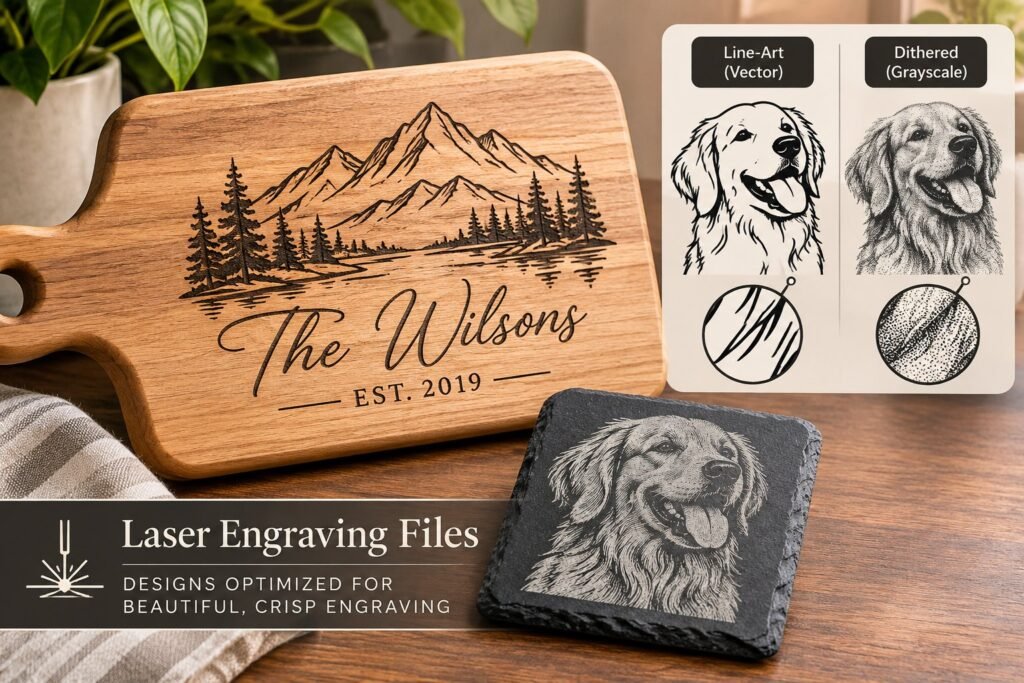
Laser engraving files
We make custom laser engraving files from your logo, photo, sketch or idea. You get laser-ready artwork in SVG, PNG or DXF, set up for the way an engraver actually burns — clean vectors for scoring and cutting, and high-contrast raster images for engraving — so the result on wood, acrylic, slate, glass or metal looks like the design, not a muddy copy of it.
Looking for laser engraving files and laser engraving designs that burn cleanly the first time? Every laser engraving SVG, PNG and DXF we make is drawn for your machine, your material and your finished size, so you are not fixing someone else’s artwork before every job.
| Price | Quoted per design — send your artwork for a price |
| What you get | Laser-ready engraving artwork, checked for your machine and material |
| File formats | SVG, DXF, PNG, PDF and AI — LightBurn, Glowforge and xTool ready |
| Proof | You approve a proof before the final files are sent |
| Delivery | By email — nothing to ship |
What makes a file laser-ready
A laser engraver reads artwork in two ways. Vector lines — the paths in an SVG, DXF or AI file — are followed by the laser head to cut or score. Raster images — PNG, JPG or BMP — are burned line by line, like a printer, to fill areas and shade. Most problems at the machine come from sending the wrong kind of file for the job, or from artwork that was made for a screen, not for a burn.
A file that engraves well has a few things in common:
- Black and white, or carefully prepared grayscale — no soft colour gradients the laser cannot interpret
- Closed, joined paths with no stray points, duplicate lines or tiny gaps that make the head stutter
- Line weights and colours set as layers, so you can give cut, score and engrave their own power and speed
- Text converted to outlines, so the file opens the same on every computer
- Enough resolution for the size — 300 to 600 DPI for raster engraving
- Detail sized for the material — very fine lines blur on soft woods and leather
What we make
- Logos and business branding for engraving on products, tools and packaging
- Monograms, initials, family names and custom name engravings
- Quotes, Bible verses and decorative lettering laid out for boards, plaques and signs
- Line art and fine-line illustrations — floral, botanical, wildlife, landscapes, mandalas and geometric patterns
- Photo and portrait engraving files, including pet portraits and memorial pieces — see photo to laser engraving
- Wedding, anniversary, birthday, graduation and holiday designs for personalised gifts
- Cutting board, charcuterie board, coaster, ornament, tumbler and plaque layouts
- Editable templates where you swap the name or date for each order
Vector or raster: which file you need
| Job | Best file | Why |
|---|---|---|
| Cutting out a shape | SVG or DXF (vector) | The laser follows the path once, at cutting power |
| Scoring an outline or line art | SVG (vector) | Thin, crisp lines at low power |
| Filling a logo or lettering | SVG or high-res PNG | Either works; vector keeps edges sharpest |
| Photos and portraits | Dithered or grayscale PNG | Shading needs dots or tones, not lines |
| 3D / depth engraving | Grayscale PNG | Darker pixels burn deeper |
| CNC machines and some industrial lasers | DXF | The most widely accepted vector format |
Engraving styles we prepare
Line art and outline engraving. Single-line and fine-line designs that score cleanly, including single line engraving SVG files for fast, low-power work.
Filled and silhouette engraving. Bold, high-contrast shapes that read from across a room — ideal for signs, logos and woodcut-style illustrations.
Dithered and halftone engraving. Photos and shaded artwork converted to dot patterns, so tones survive on materials that cannot show grey.
Vintage, rustic and distressed engraving. Etched-illustration styles and worn textures, kept within what your material can hold.
Tell us your machine and material
The same design needs different preparation for a diode laser on pine, a CO2 laser on acrylic and a fiber laser on stainless steel. Tell us what you run and what you are engraving, and we set line spacing, detail size and file type to suit. See laser engraving files by material and Glowforge, xTool and LightBurn files for the detail.
How it works
- Send your artwork, photo or idea with the finished size, material and machine
- We quote a price per design
- We prepare the file and send a proof
- You approve, or ask for changes
- You receive the final files by email
Ready-made engraving designs
We are building a library of ready-made laser engraving designs and bundles. Until it opens, every file is made to order, which means it is sized and prepared for your exact job rather than a generic template.
Laser engraving designs, made to order
Most laser engraving designs sold online are built once and stretched to fit everything. Ours start from what you are making: a cutting board, a slate coaster, a tumbler, a wooden sign or a metal tag. We set the line weights, the fill density and the contrast for that piece, so the laser engraving artwork reads at arm’s length and does not turn to mush on darker woods.
- Laser engraving SVG and vector files for crisp line work and text
- High resolution engraving PNG files for shaded and photo-style engraving
- Laser engraving DXF files for CAD-based and CNC engraving software
- Laser engraving templates sized to your blanks, with an outline for alignment
Line art, halftone and dithered engraving files
Line art engraving and fine line engraving work best on wood, acrylic and anodised metal, where a thin vector path burns as a sharp single stroke. Black and white engraving designs with high contrast suit slate, leather and dark woods. For shaded art we prepare a grayscale laser engraving image or a dithered engraving image, so the machine can render tone with dots instead of guessing. Vintage engraving designs, woodcut style illustrations and ornamental engraving patterns all need different handling, and we set each file up for the style you choose.
Engraving themes and personalised files
We draw floral and botanical engraving art, wildlife and landscape engraving designs, mandala and geometric engraving patterns, monogram engraving SVGs, family name signs, Bible verse and faith designs, memorial engraving designs, wedding engraving templates and holiday engraving designs for Christmas, Halloween, Valentine’s Day, Mother’s Day and Father’s Day. Personalised laser engraving files, such as custom name engraving files or initials engraving designs, come with editable text so you can change the name for each order.
A library of ready-made laser engraving downloads is being built. Until it opens, any themed design or laser engraving bundle you need can be made to order as a matched set.
Common questions
How much does a custom laser engraving file cost?
It depends on the detail. A simple monogram or text layout costs far less than a hand-drawn illustration or a portrait. Send your artwork and we will quote a fixed price before any work starts.
Can I use the file on products I sell?
Custom files made from your own artwork are yours to use, including on products you sell. Tell us if the design includes someone else’s logo or character — we can only work from artwork you have the right to use.
Will the file work in LightBurn, Glowforge or xTool Creative Space?
Yes. We deliver SVG, DXF and PNG, which all three accept, and we set up layers so cut, score and engrave are already separated.
Do you make laser cut files too?
Yes. See custom laser cut files for cut shapes, boxes, layered signs and ornaments.
Do I need a vector or a raster laser engraving file?
Use a vector file (SVG or DXF) for line art, text and logos, and a raster file (PNG) for photos and shaded artwork. Many designs come as both, and we tell you which one to load for your job.
Can you make engraving files for tumblers and cutting boards?
Yes. Tell us the exact blank, its size and whether you use a rotary. We size the artwork to the engraving area and add an alignment outline.
Get a free quote
Send us your artwork or idea, the finished size, the material and your laser. Choose “Vector art” as the product and add “laser engraving file” in your message, and we will come back with a price. If you cannot attach artwork here, email it to hello@sewwhatembroiderydesigns.com.
Related reading
- Custom laser cut files — SVG and DXF for cutting
- Photo to laser engraving file — portraits and pet photos
- Laser engraving files by material — wood, acrylic, glass, metal
- Vector art conversion — clean artwork from a low-res logo
- All design and file services